Skip to content
TF
Audit Intelligence

AI-assisted drafting for audit and risk work — with your auditors in control.

Audit Intelligence is built into the Audit & Risk Platform. It drafts risks, findings, engagement objectives and scope, audit programs and report narrative for your team to review, edit and decide on. Every output is labelled as a draft.

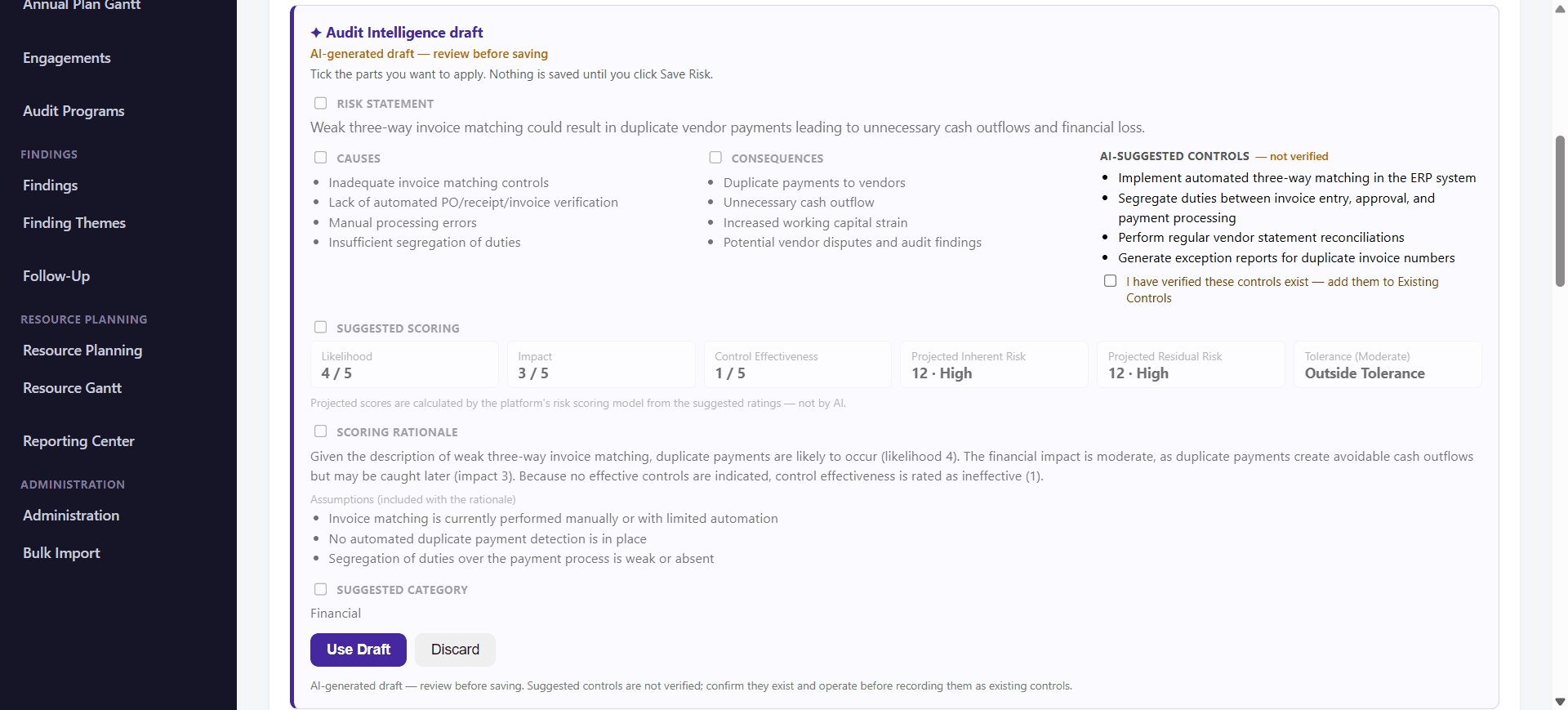
Risk Register — Audit Intelligence draft for review
Audit Intelligence risk draft in the Risk Register, labelled 'AI-generated draft — review before saving', with unticked sections for the risk statement, causes, consequences, AI-suggested controls marked not verified, suggested scoring, scoring rationale with assumptions and a suggested category, and Use Draft and Discard buttons

In brief. Audit Intelligence is the AI-assisted capability of the ThinkFinancials Audit & Risk Platform: it drafts and refines audit and risk content as drafts, and leaves review, approval and audit conclusions to people.

The business problem

Audit teams spend a large share of every engagement on first drafts: risk descriptions, objectives and scope, findings and report narrative. The knowledge exists in prior work and in the audit file, but assembling it is slow and inconsistent between auditors.

How the platform solves it

Audit Intelligence appears inside the screens auditors already use, as an optional “with Audit Intelligence” action in the Risk Register, the engagement, the findings screen and the report screen. It produces a draft, flags what is missing or unverified, and waits. Nothing is applied or saved until a person chooses it. It assists professional judgment; it does not replace it, and it does not make audit decisions.

Capabilities

Risk drafting

Enter a short risk title and get a draft risk statement, causes, consequences, suggested controls and suggested ratings. You choose which parts to apply.

Finding generation

Choose a finding template and describe what you observed. The draft sets out condition, criteria, cause, risk and recommendation, and lists missing information and unverified statements.

Objectives and scope refinement

Refine the objective and scope you have written. The proposal appears beside your current text, with what was retained, what changed and the assumptions behind it.

Audit program generation and review

Draft an audit program of proposed procedures for an engagement, or review an existing or generated program to support your evaluation and refinement. You can edit and reorder the procedures, then save the program and link it to the engagement. Auditors review and validate every procedure before use.

Audit report narrative

Draft report narrative for your team to edit. Where evidence is limited, the draft says so and proposes no conclusion rather than inventing one.

Executive presentation narrative

Draft the narrative for a chosen audience. Draft PowerPoint and PDF export controls are part of the platform’s reporting; AI drafts the narrative, not the slides.

Workflow

  1. 1Open the Risk Register, an engagement, the findings screen or the report screen.
  2. 2Choose the Audit Intelligence action and supply the title, facts or notes you want drafted.
  3. 3Review the draft. It is labelled AI-generated and flags missing information and unverified statements.
  4. 4Tick what to apply, edit it, confirm that the facts and evidence are verified, and save. Nothing is saved automatically.

Business benefits

  • Faster first drafts of risks, findings, scope and report narrative
  • More consistent structure across auditors and engagements
  • Gaps made visible: missing information, unverified causes and controls are flagged, not filled in
  • Professional judgment and the decision to save stay with your audit team
  • Part of the same platform as your audit universe, planning, execution and follow-up

In the application

What Audit Intelligence looks like in use.

Real screens from the Audit & Risk Platform, using demo data. Every output is labelled as a draft, and the review step is part of the screen.

Risk drafting

Enter a short risk title in the Risk Register and Audit Intelligence drafts the assessment for your review: a risk statement, causes, consequences, suggested controls, suggested ratings, a scoring rationale and a suggested category.

  • Each part of the draft has its own tick box. Nothing is applied until you choose it, and nothing is saved until you click Save Risk.
  • Suggested controls are labelled “not verified”. You confirm they exist and operate before recording them as existing controls.
  • Projected inherent and residual scores are calculated by the platform’s risk scoring model from the suggested ratings, not by AI.

The application reminds users not to include content from a restricted assignment in a risk draft request.
Finding generation

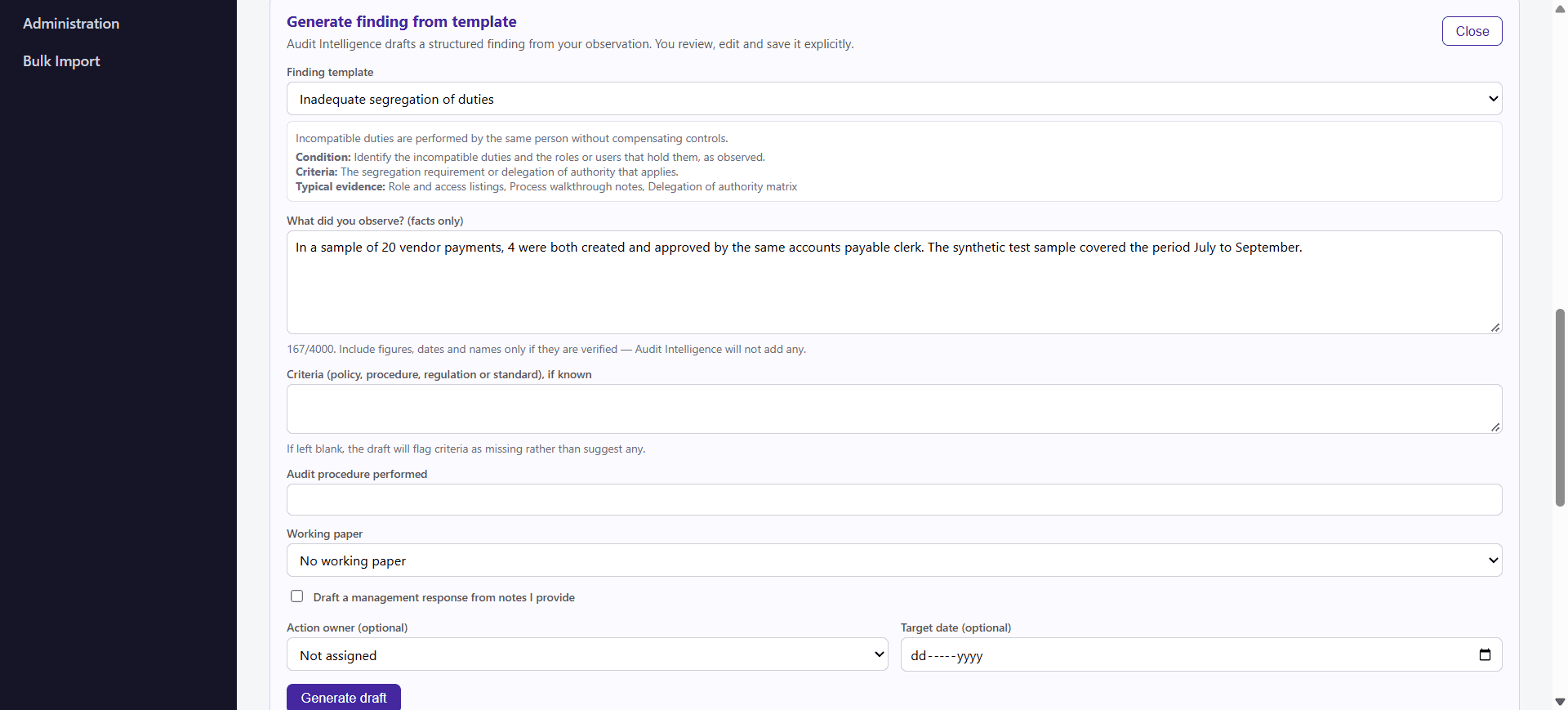
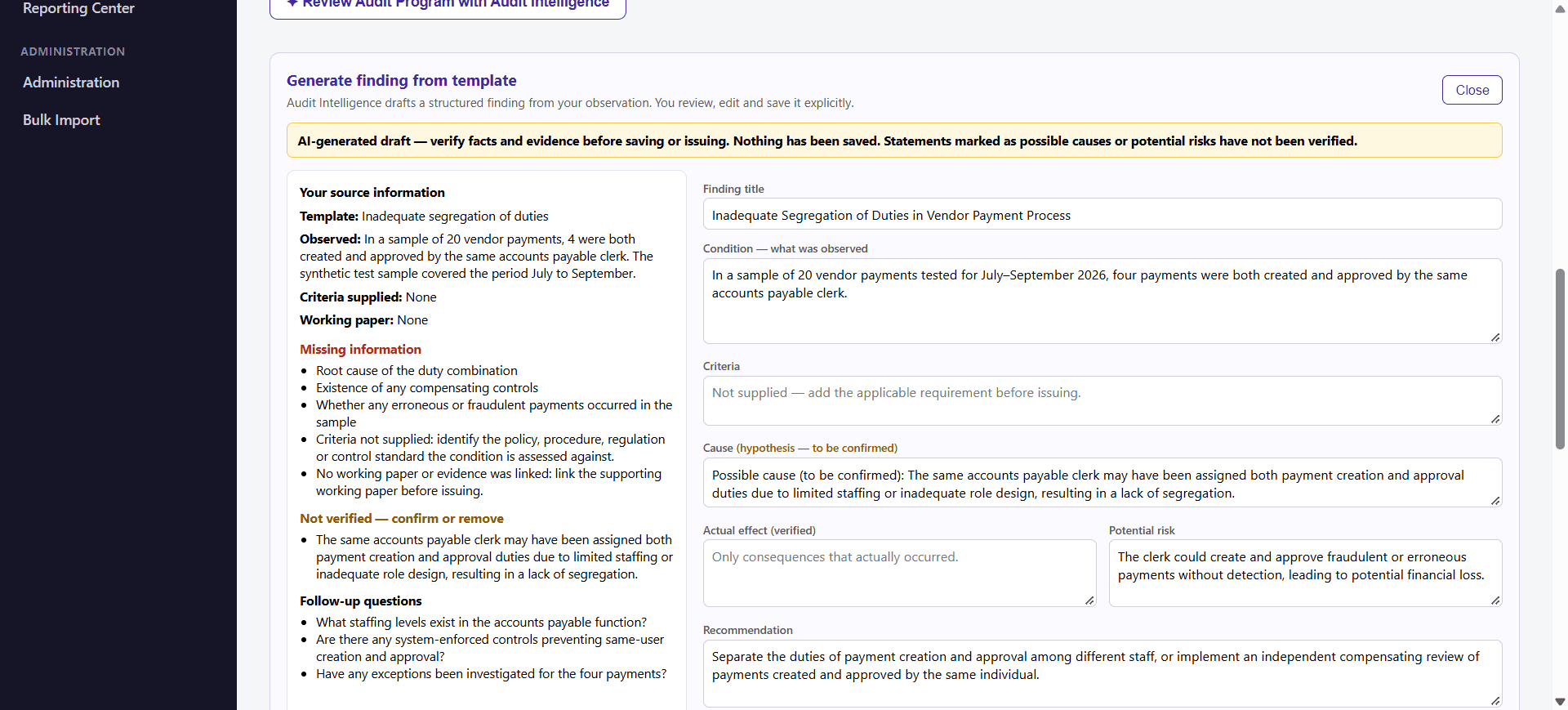
Start from a finding template and the facts you observed. Audit Intelligence drafts a structured finding with condition, criteria, cause, risk and recommendation fields, and tells you what is missing.

  • You describe what you observed, facts only. If you leave criteria blank, the draft flags criteria as missing instead of inventing one.
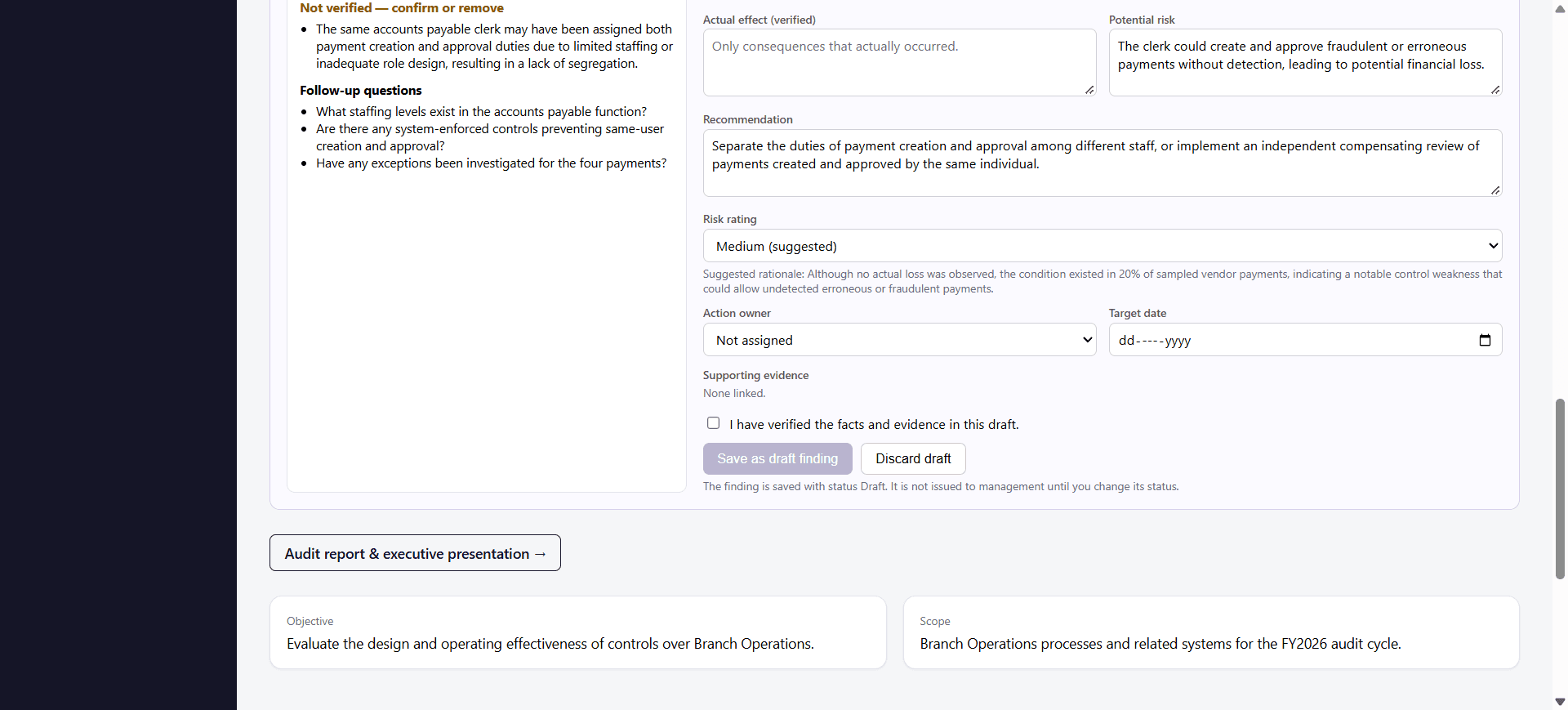
  • Possible causes and potential risks are marked as hypotheses to confirm or remove. The draft lists missing information and follow-up questions.
  • Saving is gated by a confirmation that you have verified the facts and evidence. The finding is saved with status Draft and is not issued to management until you change its status.

The example shown uses a synthetic test sample. A draft is only as good as the facts and evidence you supply.

Generate finding from template — you supply the facts
Generate finding from template form with a finding template, a facts-only observation field, optional criteria, audit procedure, working paper and action owner fields, and a Generate draft button
Finding draft — missing information and unverified items flagged
Audit Intelligence finding draft with a banner reading AI-generated draft, verify facts and evidence before saving or issuing, a list of missing information, items marked not verified, follow-up questions, and condition, criteria and cause fields
Finding draft — verify, then save as a draft
Lower part of the finding draft showing recommendation, a suggested risk rating with rationale, action owner and target date, a checkbox confirming the facts and evidence have been verified, and Save as draft finding and Discard draft buttons

Objectives and scope refinement

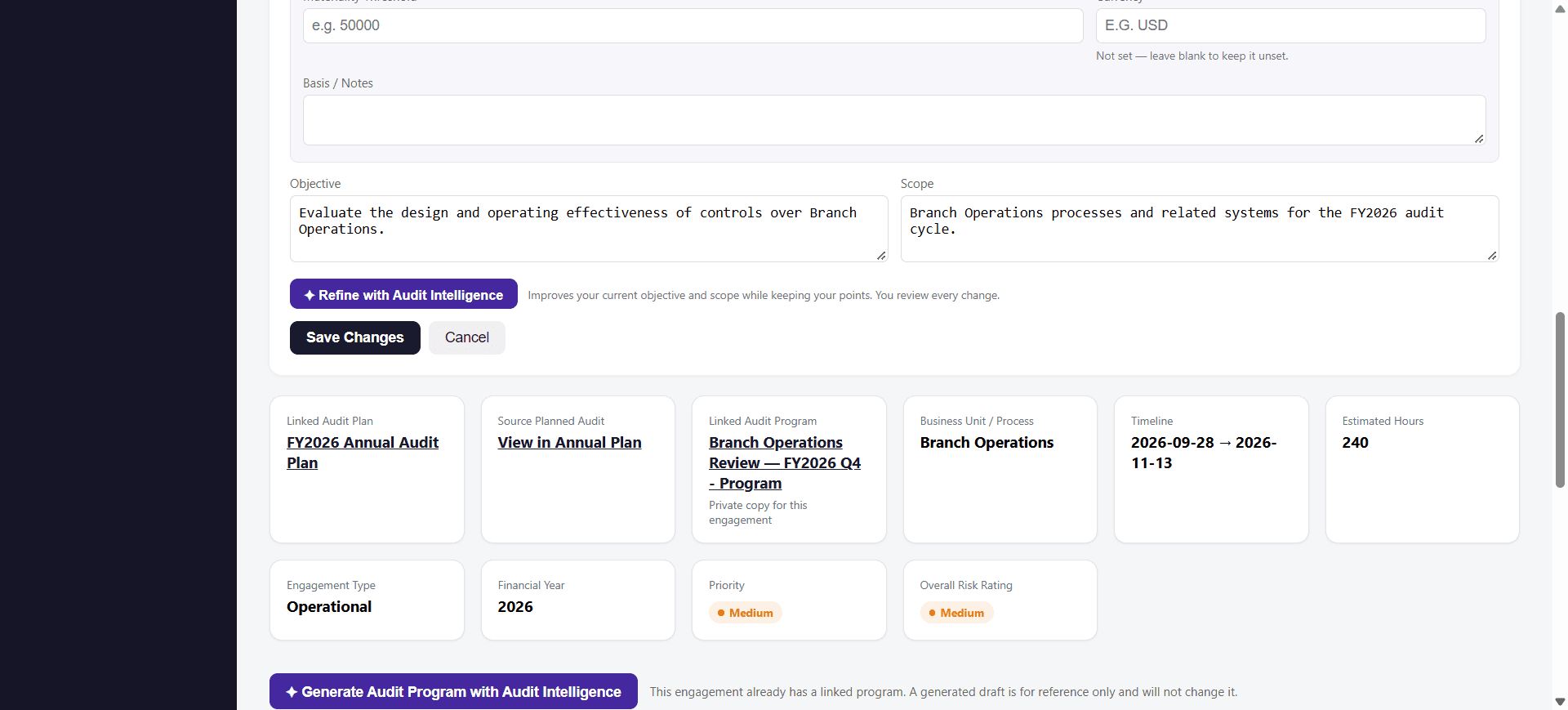
On an engagement, refine the objective and scope you have already written. Audit Intelligence proposes improved wording while keeping your points, and shows the proposal next to your current text.

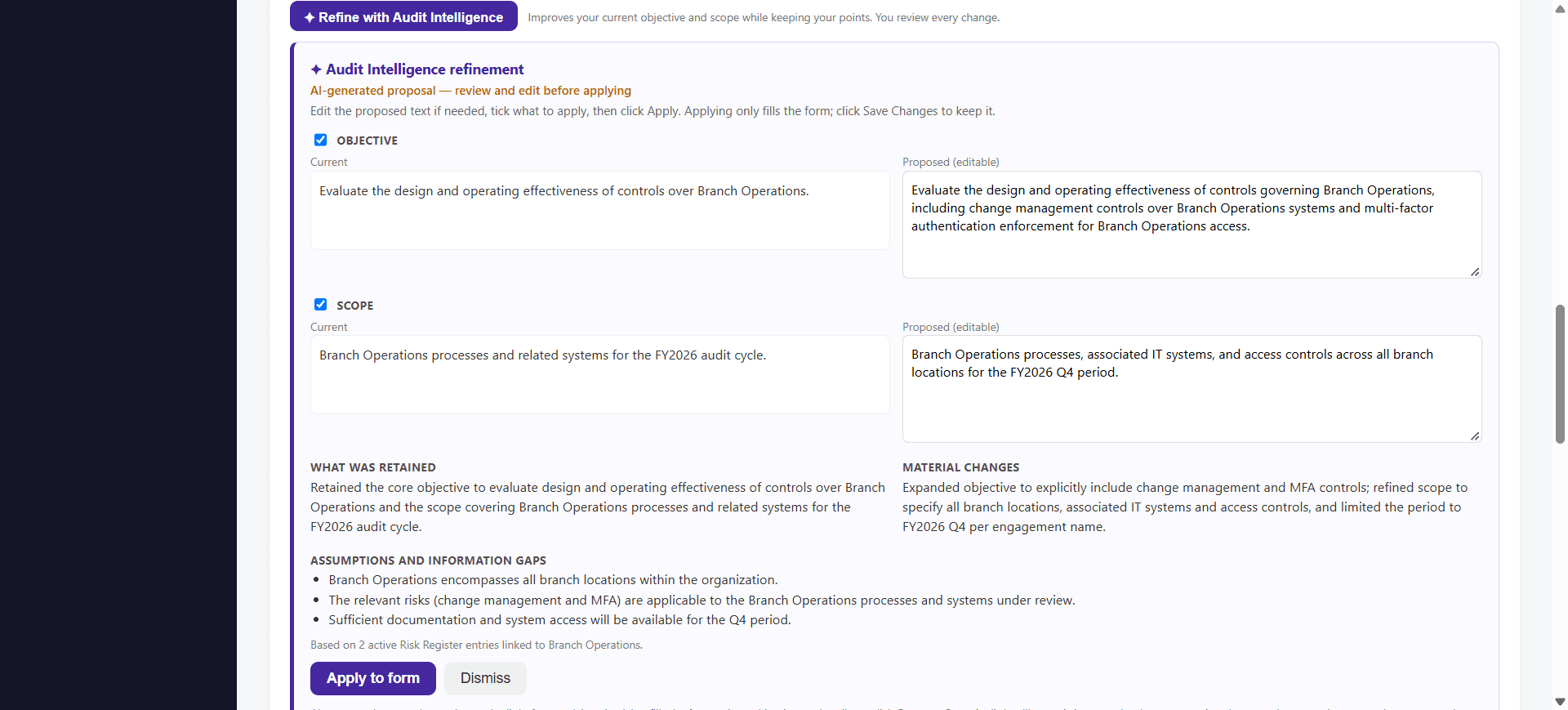
  • Current and proposed text sit side by side. The proposed text is editable.
  • The proposal states what was retained, what materially changed, and the assumptions and information gaps behind it.
  • You tick what to apply. Applying only fills the form; you click Save Changes to keep it.
Engagement — Refine with Audit Intelligence
Engagement edit form with objective and scope fields and a Refine with Audit Intelligence button that notes the user reviews every change
Objective and scope — current vs proposed
Audit Intelligence refinement proposal comparing the current and proposed objective and scope side by side, with editable proposed text, what was retained, material changes, assumptions and information gaps, and Apply to form and Dismiss buttons

Audit program generation and review

For an engagement, Audit Intelligence can help draft an audit program of proposed procedures, and can review an existing or generated program to support your evaluation and refinement of those procedures.

  • Generation produces a draft audit program to give your team a structured starting point. It is a proposal, not a finished program, and it passes the platform’s validation checks before it is offered for editing.
  • You can edit any procedure and reorder the procedures, then save the program and link it to the engagement. Your edited wording and revised order are what is stored.
  • Review looks at an existing or generated program and offers observations to help your auditors evaluate and refine the procedures.
  • Auditors must review, edit and validate every proposed procedure before it is used in an engagement. Audit Intelligence does not perform audit testing or execute the program.

Intended to help teams structure procedures, improve consistency and reduce manual drafting. A draft is only as good as the engagement context you supply.

Audit report narrative

In the report screen, Audit Intelligence can draft report narrative for your team to edit. The draft is labelled as AI-generated and must be verified against the engagement records before use.

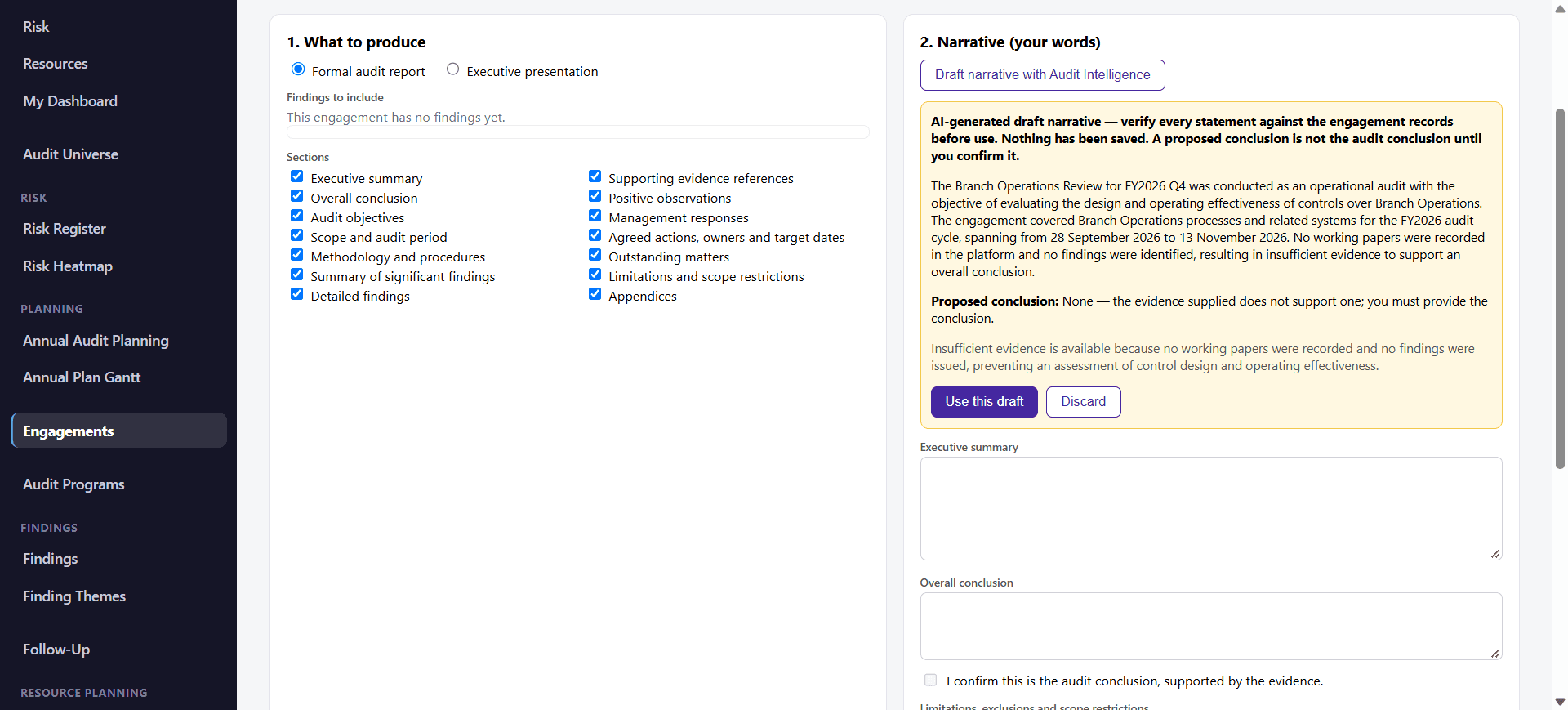
  • The example engagement has no working papers and no findings, so the draft says there is insufficient evidence and proposes no conclusion. That is the intended cautious behaviour, not a finished audit report.
  • A proposed conclusion is not the audit conclusion until you confirm it: the conclusion field has its own “I confirm this is the audit conclusion, supported by the evidence” check.
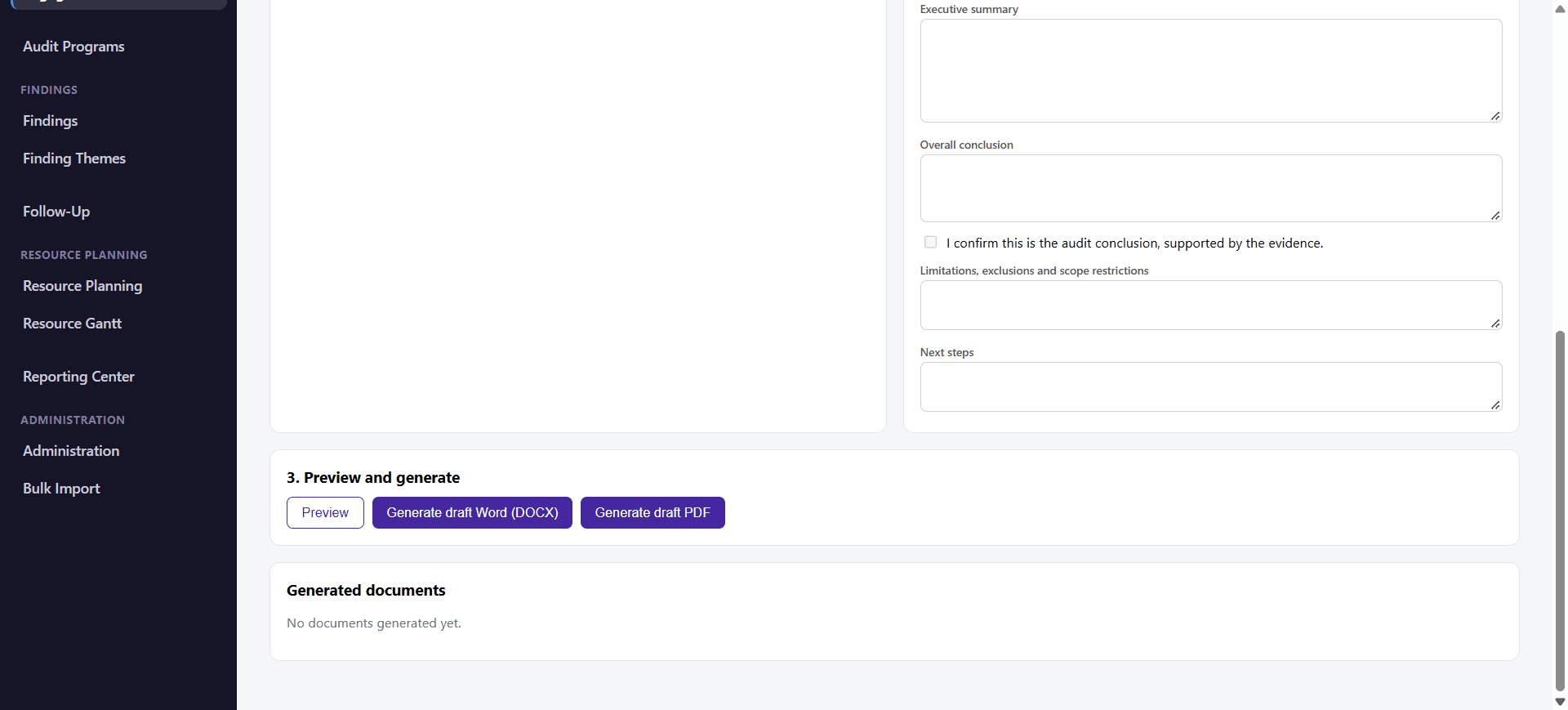
  • Draft Word (DOCX) and PDF export controls are available for the formal audit report.
Audit report — narrative draft on thin evidence
Audit report and executive presentation screen with the Formal audit report option selected and an AI-generated draft narrative for an engagement with no working papers or findings, which states insufficient evidence and proposes no conclusion
Audit report — draft Word and PDF export controls
Audit report screen showing empty narrative fields, a confirmation checkbox for the audit conclusion, and Preview, Generate draft Word (DOCX) and Generate draft PDF buttons

Executive presentation narrative

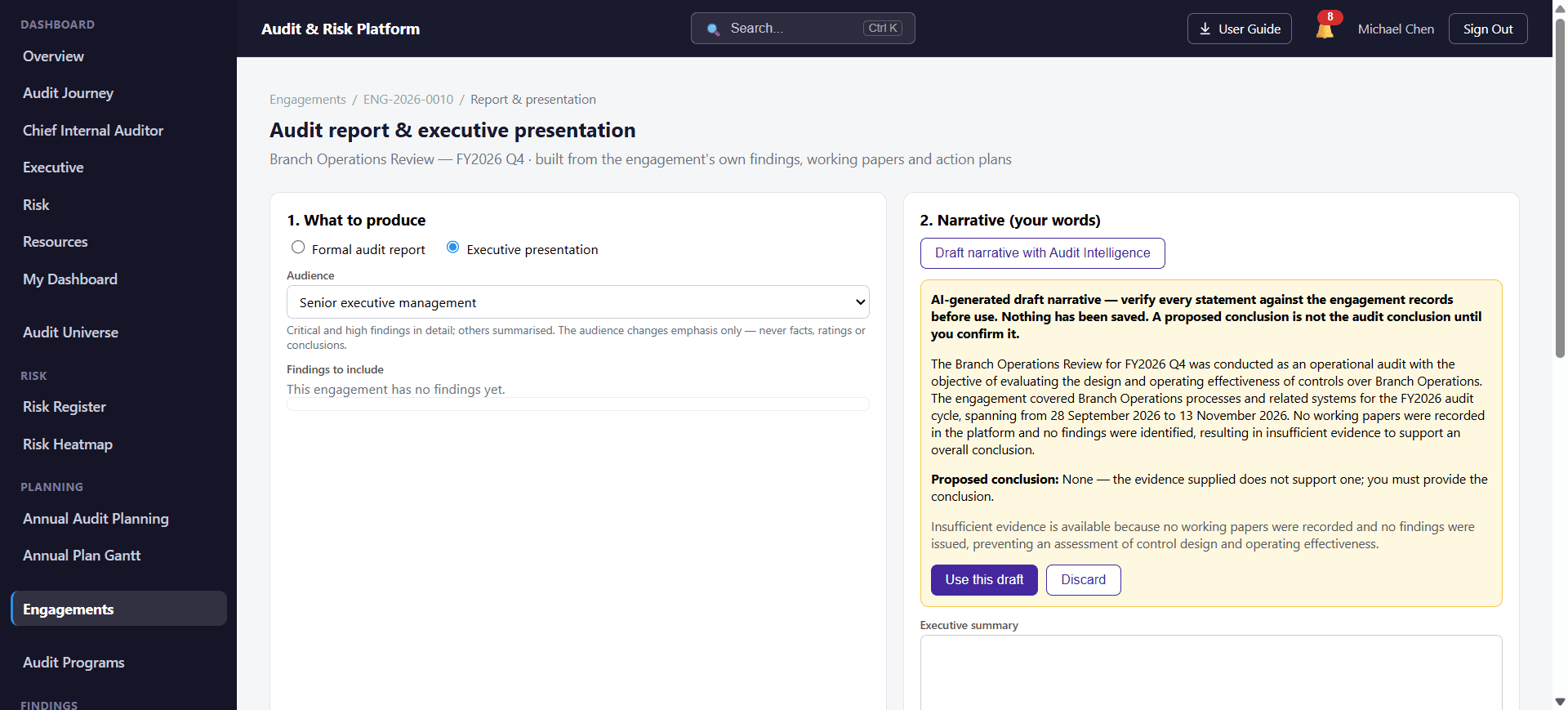
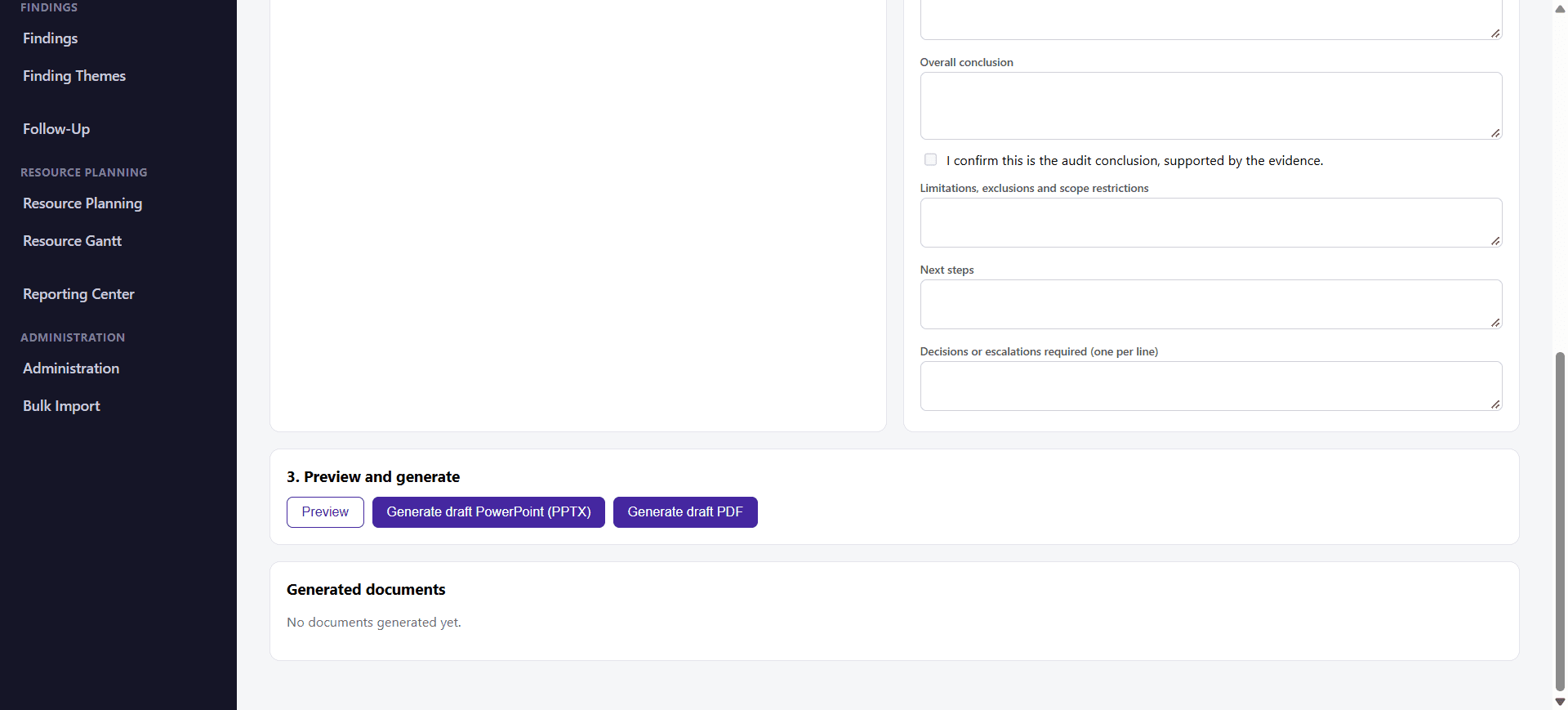
Choose Executive presentation, select the audience, and draft the narrative with Audit Intelligence. Draft PowerPoint (PPTX) and PDF controls then produce the output from the engagement’s records and your narrative.

  • The audience setting changes emphasis only, never facts, ratings or conclusions.
  • AI drafts the narrative. It does not generate or design the slides.
Executive presentation — narrative draft
Executive presentation mode with a senior executive management audience selected and an AI-generated draft narrative that must be verified against engagement records before use
Executive presentation — draft PowerPoint and PDF controls
Executive presentation screen with narrative fields, a conclusion confirmation checkbox, and Preview, Generate draft PowerPoint (PPTX) and Generate draft PDF buttons

Responsible use

  • Audit Intelligence drafts and suggests. It does not approve findings, issue reports, sign off work or make audit conclusions. A proposed conclusion is not the audit conclusion until an auditor confirms it.
  • Not every audit activity is automated. For example, AI drafts presentation narrative but does not create slides. Auditors remain responsible for evidence, judgment and conclusions.
  • AI-generated content can contain errors or omissions. Check every draft against your evidence before it is relied on.
  • A draft is only as good as the facts and evidence you provide. With limited evidence, the draft will say so; it should not be treated as a completed, evidence-backed report.
  • Audit Intelligence is included in the Professional and Enterprise packages and is not included in Starter. Contact us to confirm what applies to your organization.

Related capabilities

Audit Intelligence helps internal audit and risk teams work more efficiently by using AI to assist with drafting risks, audit findings, objectives, scope and report narratives. Explore our Platform Overview or Compare Packages to learn more.

See the Audit & Risk Platform in action.

Watch the demo or talk to the team to see how the platform fits your audit function.

Prefer a live walkthrough? Book a demo